Contents▾
How to play
Play from ExplorePlaying a chatPlaying storiesHow Ink worksSet up your personaPlay with diceHow to create
A worked exampleCreating a characterCreating a scenarioInline images: illustrations in the chatMoving the story with phasesEmotion parameters for personalityFeed world facts on demandBuilding a TRPGMake images and videoPublish your workGetting better
Writing so the AI understandsSet up your persona
A persona is the person you play in story and scenario chats. Give it a name and a profile, and the AI calls you by that name while the characters treat you as that person. It is optional: without one, you play under your display name.
A persona sets two things
There are only two fields, "Name" and "Profile", but they work in completely different ways.
- Name = what you are called. Every
{{user}}in the author's text is replaced with this name (the world setting, lorebook, chapter openings, each cast member's "relationship to the user", and so on). When the end of a reply records each cast member's relationship, it is written as their attitude toward this name. - Profile = who you are. It reaches the narrator as a section of its own, "(name) = the person the user plays", and becomes the background for how the cast reads what you say and do.
However much you write in the profile, the AI never writes your lines, actions or inner thoughts. The narrator is told explicitly: "do not write this person's lines, actions or thoughts; describe them only as others see them." The profile is not a script for the AI to play you with; it is material that decides how the others see you.
Where personas live
The format (name + profile) is the same everywhere. What differs is who creates it and whose choices it shows up in.
- My personas: your own stand-ins, created on the My personas page. They appear in the choices when you start a story or a scenario, and you can use them as they are in works made by other people.
- This story's personas: "Protagonists of this story (personas)" in the "Personas" step of the story editor. These are slots the author prepares, and they appear in the choices for everyone who plays that story. Use them when you want to decide up front that "the protagonist is one of these three".
- Protagonist for this scenario: "What the character calls you here" and "Who you are in this scenario", which the author writes in the "You & the character" step of scenario creation. These two are saved as the scenario's protagonist and appear in the choices for anyone who plays that scenario.
You cannot add a slot of your own to someone else's work. If the work's slots are not to your taste, create a persona in My personas and bring it along.
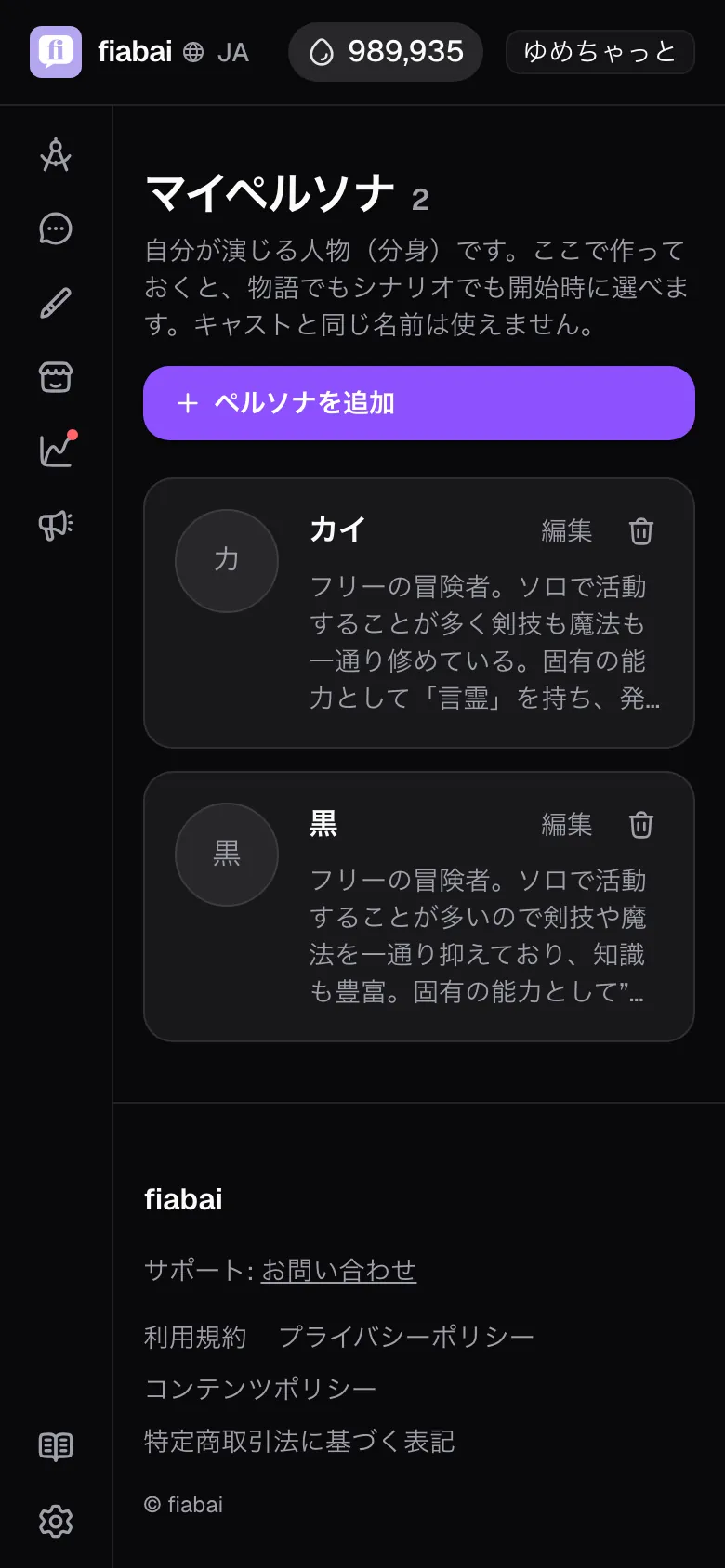
Creating a persona in My personas
- Open the My personas page (you can also get there from "Create & manage personas" in the start dialog of a story or scenario).
- Under "Add a persona", enter the name you want to be called in "Name (e.g. Kai)".
- In "Profile (e.g. A thief. Skilled at lockpicking, sharp-tongued but loyal.)", write 1–3 lines on occupation, standing, skills and personality quirks. You can also save it empty.
- Press "Add" to save it. You can rewrite it any time with "Edit" in the list.
- Once added, press the icon on the card to set an image. That makes your stand-in easy to spot in the list when you start.
Choosing when you start a chat
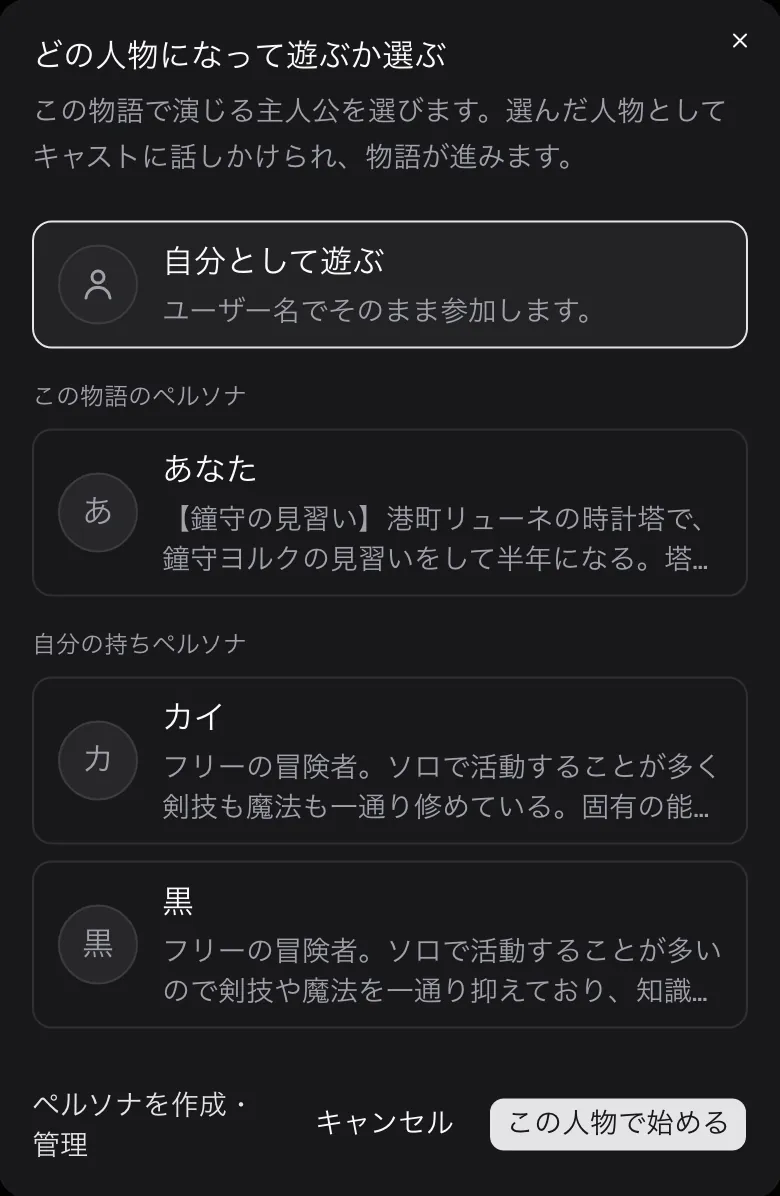
Press "Play" on a story (or "Start fresh" on a story you are already playing) and the "Choose who to play as" dialog opens. It lists three kinds of option.
- Play as yourself: the default. Your "Display name" from settings becomes the name, and the profile stays empty.
- This story's personas: the options the author prepared.
- Your personas: the ones you made in My personas. A persona with an empty name shows as "Play as yourself", and choosing it means you are called by your display name.
Pick one and press "Start as this person", and the chat begins with you as that person.
In a scenario, you choose under "Who are you playing as?" in the dialog shown when you start a chat. It lists the author's "Protagonist for this scenario" and your own "My personas". The details are in the section below.
Your choice is fixed when you start
The moment you start, the chosen persona's name and profile are copied into that play or chat. Editing or deleting the persona afterwards does not change what you are called or your profile in a play already in progress (the delete confirmation says so too: "Plays and conversations already in progress keep the values from when they started, so they are unaffected.").
So there is no way to swap personas partway through a chat. To put a rewritten profile to work, fix the persona and then set up a separate chat: "Start fresh" for a story, or start a new chat for a scenario. You can run the same work with different personas side by side.
Recipes: what you want → what to write
Goal
I want to be called by a name from the story, not my real name or display name
Where: My personas = Name
What to write
Name
A name that fits that world, such as "Kai".
Every {{user}} in the author's text is replaced with exactly this spelling.
Profile
Can be empty. If you only want to change what you are called, this can wait.
What happens
The narrator and the cast all call you "Kai", and the relationship record for each cast member is kept as their attitude toward Kai.
Note: The name is inserted exactly as written. If you want people to call you both "Kai" and "Kai-kun", give the AI material in the profile, such as "older people call him little Kai".
Goal
I want reactions that take my occupation or standing into account
Where: Profile in My personas + the relationship field in the story editor's "Cast" step
What to write
Profile
1–3 lines on occupation, skills and personality quirks, such as "A spy for the royal capital. Easy to get along with, but never tells anyone their real name."
Relationship to the user (e.g. bodyguard of '{{user}}')
"Bodyguard of '{{user}}'. Follows orders, but speaks up against anything reckless."
One line per cast member. Set it in the "Cast" step of the story editor.
What happens
The narrator reads the profile as background, and each cast member approaches you starting from their one-line relationship. The relationship updates as the chat goes on.
Note: A relationship with a specific cast member, such as "childhood friend of ◯◯", works more reliably in that cast member's relationship field than in your profile. The profile is background shared with the whole cast.
If you leave it blank
Choose "Play as yourself" and the name comes from Settings: your "Display name". It is the same name shown as "by display name" on Explore, so if it is a handle full of symbols, that is exactly what the story text will call you. If it does not suit the world, the quickest fix is a persona with just a name.
The profile stays empty, and the narrator receives no section explaining who you are. The chat will not break, but the cast treats you as someone whose background they do not know, and no reactions build on your occupation, past or skills. If you want to be treated as a seasoned mercenary, one line in the profile is enough to change that.
If you choose "Play as yourself" without setting a display name, the narrator calls you "the user", and the author's {{user}} is not replaced and stays in the text as is. Always fill in either a display name or a persona name.
Common snags and fixes
- You see "The name duplicates a cast member's name" and cannot start → the persona name exactly matches a cast name in that story. It is checked against every cast member in the story, so it also collides with cast who only appear in later chapters. Change the name, or pick a different persona for that story.
{{user}}shows up in the text as is → this happens when the name is empty (you chose "Play as yourself" without a display name). Set a display name, or start again with a persona that has a name.- The narrator writes your lines and actions for you → the narrator is told to "not get ahead of your next action, and to close each reply on other people's reactions or the scenery". If it still speaks for you, take instructions for action such as "does…" or "says…" out of the profile and rewrite them as descriptions of character, such as "quick with a joke".
- You fixed the profile but the reactions have not changed → a play in progress is fixed to what it had at the start. Set up a separate play with "Start fresh".
- The persona you want is not in the dialog → "Your personas" and "My personas" list only what you registered on the My personas page, and "This story's personas" and "Protagonist for this scenario" list only what the author registered on the work. You cannot add a slot of your own to a work, so create it in My personas.
- A scenario does not offer a persona choice → scenarios without phases start the chat without the dialog. In that case, what you are called is decided in the order given in the section below.
"You" in scenario chats
You can choose a persona in one-on-one scenarios with a character, too. When you start a chat in a scenario with phases, the dialog for choosing how to play has a "Who are you playing as?" section, where you pick the author's "Protagonist for this scenario" or one of your own "My personas".
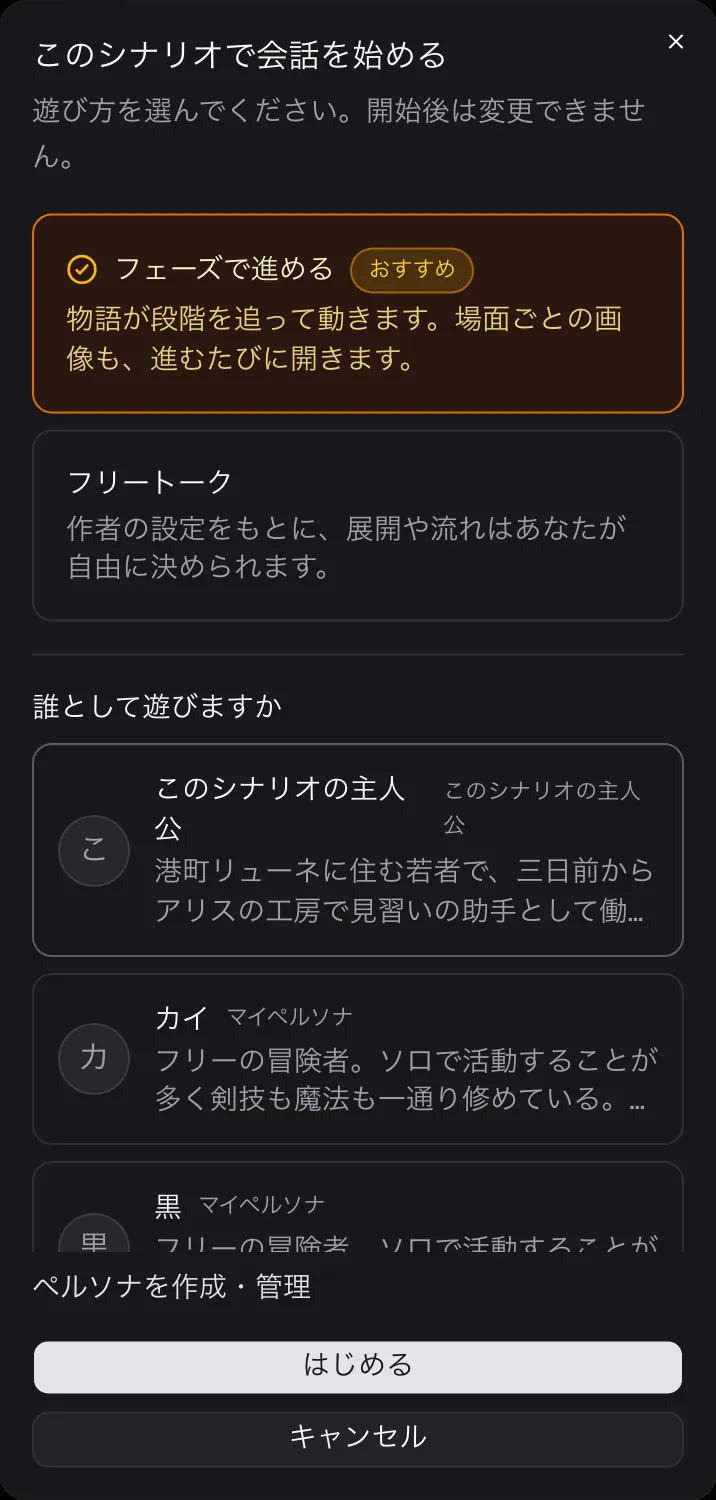
What you are called is decided in this order.
- The name of the persona you chose in the dialog (your "Display name" if you chose "Play under my display name")
- If you chose nothing, the author's "What the character calls you here (optional)"
- If the author left that empty, your "Display name"
- If there is none of those, "the protagonist"
Scenarios without phases show no dialog, so it is decided from the second step down.
When you write a scenario as an author, the "You and the character", "What the character calls you here" and "Who you are in this scenario" fields in the "You & the character" step of scenario creation let you prepare the player's standing and profile. Fill in the name and profile and they appear in the choices as the "Protagonist for this scenario", which keeps how the character addresses you and how close they stand steady throughout the chat. See the Creating a scenario chapter for details.
Note that the perspective switch is a setting for how the text is written, not a setting about you. Whether you choose first or third person, what you are called and how your profile is used stay the same.
{{user}}, and the same spelling goes into each cast member's one-line relationship. One to three lines of profile is plenty; keep it to occupation, standing, skills and personality quirks, and the cast's reactions change to reactions toward someone whose background they know.