Contents▾
How to play
Play from ExplorePlaying a chatPlaying storiesHow Ink worksSet up your personaPlay with diceHow to create
A worked exampleCreating a characterCreating a scenarioInline images: illustrations in the chatMoving the story with phasesEmotion parameters for personalityFeed world facts on demandBuilding a TRPGMake images and videoPublish your workGetting better
Writing so the AI understandsMoving the story with phases
Phases split a story into stages. Players play the set flow the author built, scene by scene. When an event you chose happens, the story moves on to the next stage, so you can steer it where you want it to go.
What are phases?
Just as a book or a drama is divided into chapters, phases divide your story into stages. Players are free to improvise inside a stage, but the AI will not go beyond what you defined for the current stage until the conditions to move on are met. That is how a story moves forward step by step: they meet, they grow closer, they open up.
Phases as one way to play
A scenario can be played in two ways: "Advance through phases" and "Free talk". In a scenario with phases, players choose which one to play when they start a chat.
- Advance through phases: play the flow the author built, scene by scene. The scenario's "Setting (the base for the chat)" is not passed in, so even if the setting describes what happens later in the phases, nothing is spoiled.
- Free talk: built on the setting and the world setting, with the player deciding how the story goes. Text written in phases is not passed in.
- With only one scene, free talk is the better fit. If you build just one phase with no transitions, the editor shows an "Open free talk" prompt. Write the setting, and you can leave how the story develops to the player.
What it looks like in the chat
When how to advance is "Player chooses", "After a number of messages" or "When feelings reach a level", an "Advance to ‘…’ →" button (at a branch point, one button per option) appears below the latest message once the story can move on. "Advance when an event happens" and "Let the AI decide when" show no button and move on by themselves once the conditions are met.
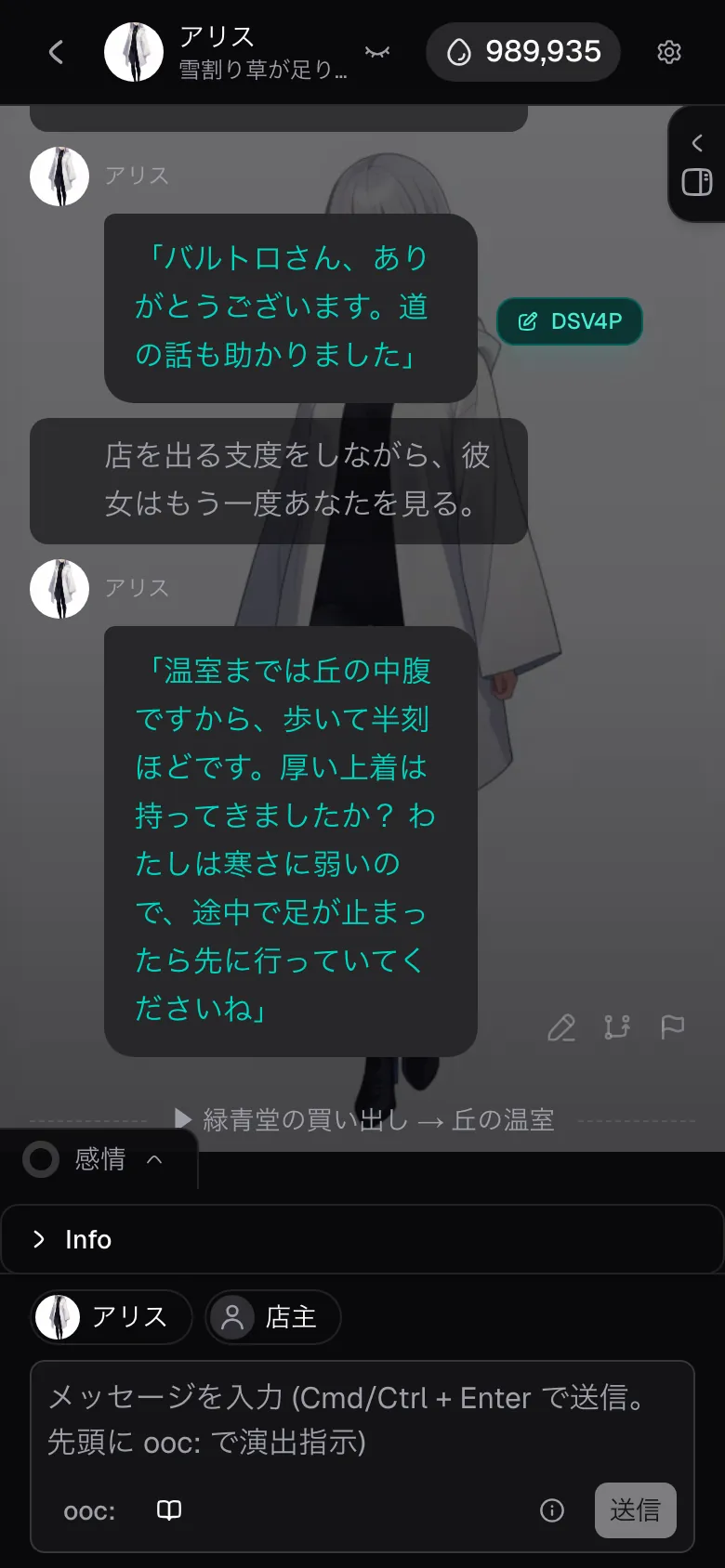
You can check what each stage is about, read-only, in the "Phases" tab of the right-hand panel on a computer, or from the book icon next to the input on a phone.
Finding your way around the editor
Choose "Advance through phases" in the Flow step of the scenario editor to build them. The phase flow is on the left, and the fields for the selected phase are on the right.
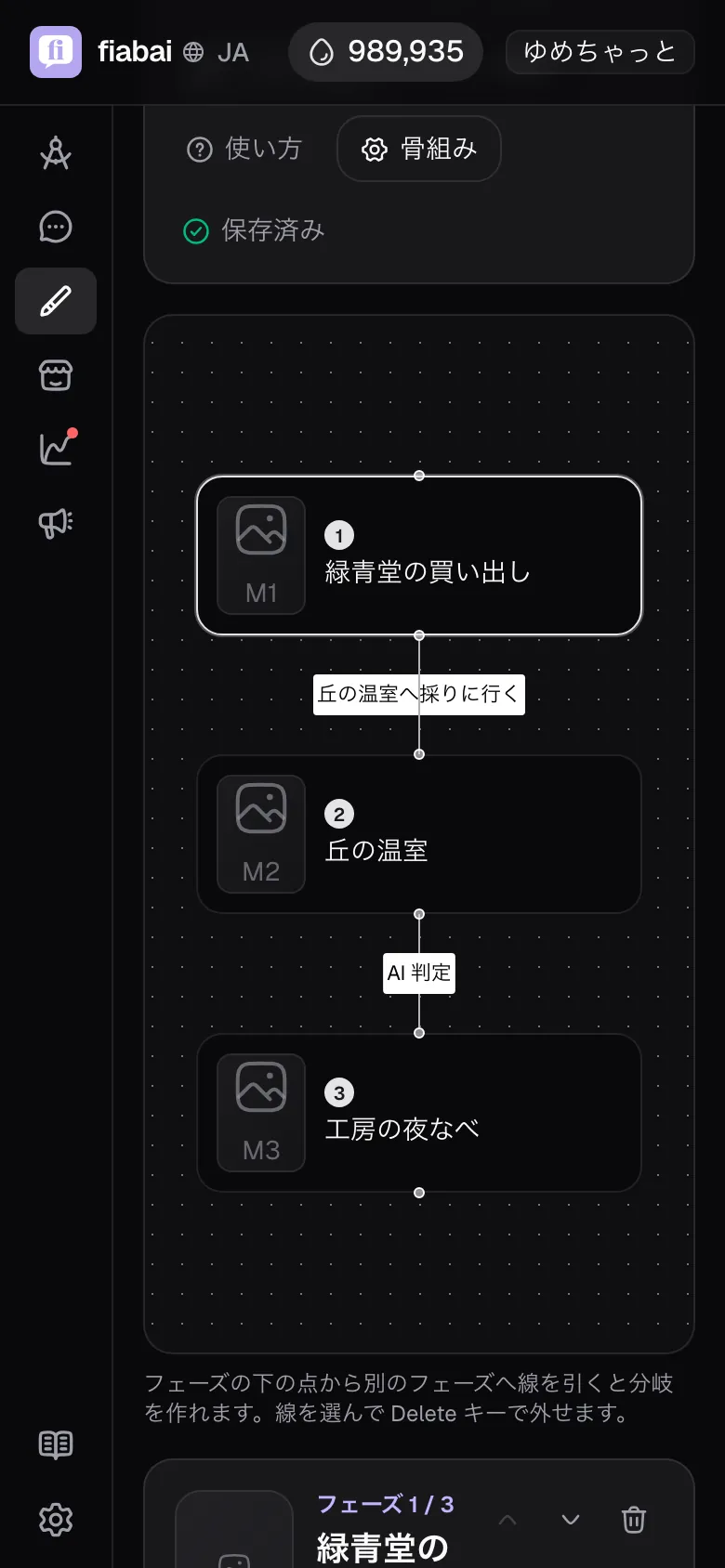
- The flow on the left: phases are listed from top to bottom, and between them one sentence says what makes the story move on. Click a phase to open it on the right.
- This phase at a glance: at the very top of the fields, what you wrote is shown as a single paragraph. You can read back what kind of scene it is, how the character talks, and what makes it move on to which phase.
- Ready check: once a phase has all three of "Name", "Role in the story" and "Connection", it gets a check mark. The bar at the top shows how many phases are ready.
- Saving: when you change something, a "You have unsaved changes" bar appears at the bottom of the screen. Save from there, or with "Save" in the top bar.
Editing as a diagram
Switch the top bar to "Diagram" and the phases are laid out as a diagram. Drag a line from the dot under a phase to another phase to create a branch. Select a line and press Delete to remove the connection. Even a story with many forks and merges can be put together while you look at its overall shape. Switch back to "List" to write the contents in the original layout.
Start from Alice's example
While there are no phases yet, you can insert an example with "Insert the example" in "Try Alice's example". It is an everyday story: sheltering from the rain in a secondhand bookshop, you meet Alice, who is minding the shop. It has four phases and one branch split by a choice, so you can see exactly how each field is filled in. Once it is inserted, you can rewrite it into your own story.
Building it with Alice
Press "Build with Alice" at the top right and a chat panel opens at the side. Describe the flow you want — "make it five phases where they grow closer" — and Alice puts together an outline and proposes it. Once you confirm, she creates that many phases. You can shape it by talking, even with no setting written.
- If phases already exist, building again replaces the current phases (this cannot be undone). The confirmation shows the count, so decide there.
- What it creates is a single line with no branches. To split routes, connect destinations afterwards with "Add branch" in each phase.
Start from a template
From "Templates" in the top bar, you can pour in a common structure. Pick a shape such as "3 phases" or "two-way branch → merge" and the skeleton of the phases and how they advance is laid out for you, so all that is left is rewriting the contents for your own story. Save a structure you use often with "Save current structure" to turn it into your own template and reuse it in other scenarios.
The fields in each phase
The fields are split into four sections, from top to bottom. You do not have to fill in all of them — sections 1 and 3 alone are enough to get things working.
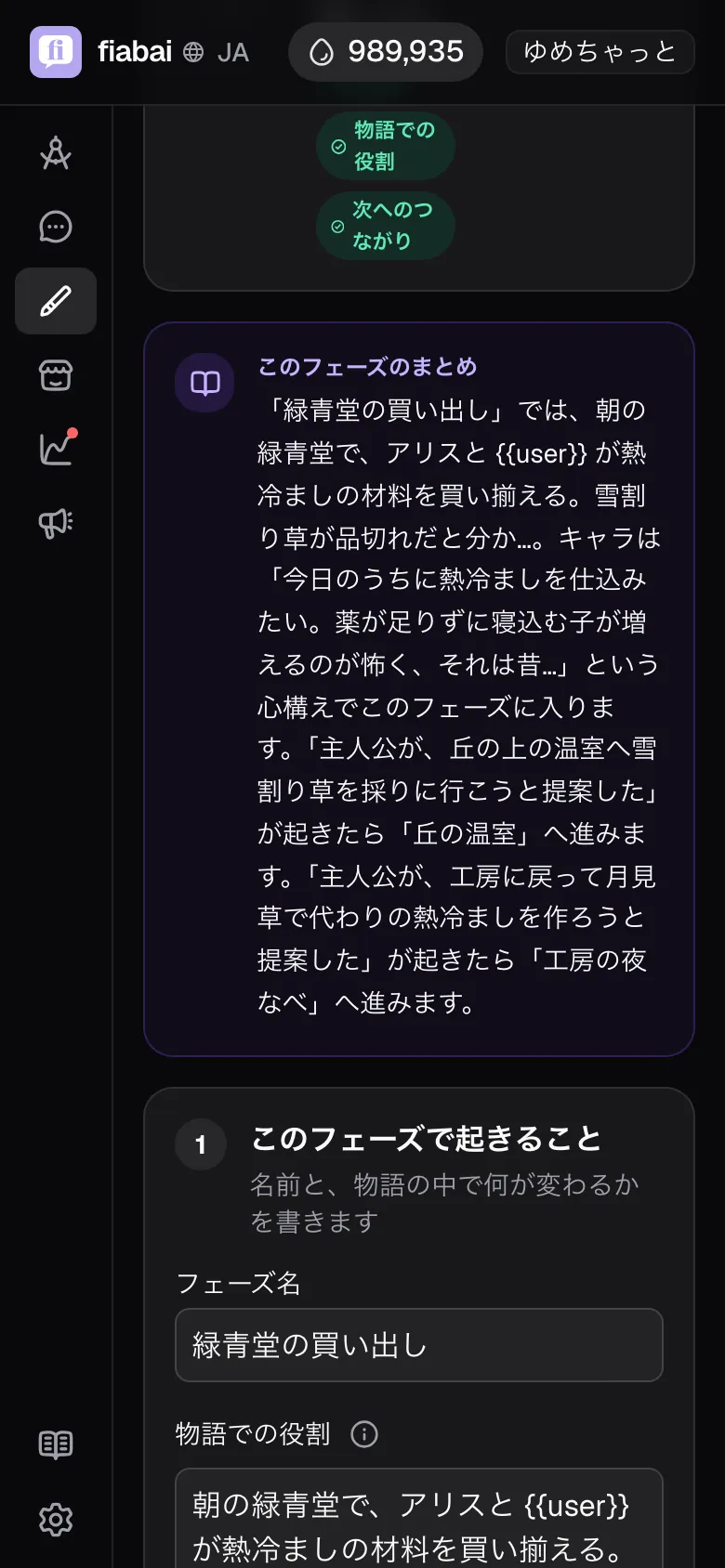
- 1. What happens in this phase
- Role in the story: the change that happens in this stage. For example: "the other person starts to show a little of what they really think". It is passed to the AI every turn while the phase lasts, and when and how the event happens is paced to how the other person responds.
- Stance on entering this phase: write what the character wants and what they fear when they enter the phase, and why. For example: "I want to know more about them. But I'm afraid that if I push too far, they'll stop coming to the shop — I once bombarded a regular with questions and made things awkward." This field is passed only to the exchanges right after the phase begins; after that, what has happened in the chat takes priority. Written as wants and fears, the character's attitude shifts naturally with the flow of the chat within the phase.
- 2. How the character talks and how far they go
- Tone of voice: how the character speaks and shows emotion. Changes over time — "formal at first, gradually more casual" — belong here too. It is passed every turn while the phase lasts.
- How far they may go: how far things may go. For example: "words only", "up to a change in how close they stand". This limit is kept while the phase lasts.
- 3. When to move on: what makes the story move on, and to which phase (next section).
- 4. Direction details (optional): grouped into collapsible sections, each showing in its heading how many fields are filled in.
- Story devices: "Facts revealed in this phase". Revealed facts are not passed to the AI until the story reaches that stage, so the ending or a hidden identity cannot be spoiled. Secrets kept from the character to the very end go in the scenario's "Hidden facts kept from the character".
- Character's initiative: "Goal of this scene" and "Note when entering the phase". In the goal of this scene, write the direction the character wants to head on their own (for example: "you (the character) want to ask the protagonist about their day, unprompted"). It is passed as the character's wish, not an order, so the character steers the conversation naturally to fit how the other person responds and what has been said so far.
- Starting feelings: the character's feeling values the moment this stage begins (see the next chapter). The same group has two more fields.
- Internal state: one line of what the character feels inside on entering the phase. Like the stance, it is passed to the exchanges right after the phase begins.
- What moves the emotions: write what makes the feeling values move, such as "keeping a promise raises trust". This field is read by the AI that moves the values, and is not passed directly to the character's lines.
- Notes: scene details that do not fit in the other fields.
Press the image frame in the heading of the fields to attach an image to each phase. While the story is in that phase, the image on the chat screen switches to this one, so the picture changes as the scenes move on. In a phase made into an ending, it is shown as the picture for that conclusion when the player reaches it.
Choosing how to advance
In "When to move on", you pick how to advance from five cards. We recommend "Advance when an event happens". Stages move along with the flow of the conversation, without the player pressing "Next".
- Advance when an event happensrecommended: when the AI judges that an event you wrote has happened in the chat, the story moves to the next stage on its own. You can use the story's turning points directly as conditions: "once the protagonist confesses the secret", "once the two of them head outside". The player never has to think about pressing "Next" and can stay in the conversation.
- Player chooses: choice buttons appear during the chat, and the story goes where the player picks. For when you want to branch, or want something that reliably works first.
- Let the AI decide when: no condition to write; the AI moves on at a natural break (see the section below).
- After a number of messages: once the player has talked the set number of times, a "Next" button appears, and pressing it moves the story on. For when you want the player to stay in this scene a bit longer.
- When feelings reach a level: once values such as trust reach your target, a "Next" button appears, and pressing it moves the story on. For when you want to wait for trust to grow.
Only two of them move to the next stage automatically: "Advance when an event happens" and "Let the AI decide when". With the other three, a button appears once the story can move on, and it moves on when the player presses it.
"Let the AI decide when"
Suited to an open stretch where you cannot pin down an exit condition, such as "on the way to a destination". You write no condition; once the set number of exchanges has passed, the AI judges whether it is time to wrap up this stretch and moves on by itself. The difference from "Advance when an event happens" is that you write no event and leave the timing to the AI.
(1) It is only available when there is a single destination (not on a phase with branches). (2) "Stay at least N exchanges" must be 1 or more (so the stretch cannot end in a single turn; choosing this option fills in 3).
Adding endings
For a phase that is one of the story's conclusions, turn on "Make this phase an ending" below "When to move on" in the editor, and it counts as an ending. The ending is achieved the moment the player enters that phase, and the phase title becomes the name of the ending.
We recommend marking the phase that comes after the outcome is decided. Keep the battle at the Demon Lord's castle as an unmarked final chapter, and write "defeated the Demon Lord" and "fell to the Demon Lord" as the conditions of the branches leaving it. Put ending phases such as "Triumphant return" and "A kingdom sunk in darkness" at the end of those branches, and the deciding scene stays open to the player's actions until the very end, while the way it turned out is recorded as an ending.
- Explore cards get an ending icon, and the work's detail page shows the count, such as "Endings 4". Players can tell the story has conclusions before they start, so your work is found as one worth replaying. In "Story flow" on the detail page, phases made into endings are labelled "Ending".
- Players who reach one see "You reached the ending ‘…’" in the chat. If the phase has an image, it is shown alongside as the picture for that conclusion.
- The top of the chat screen shows an achievement, "Endings 2/4". Tapping it lists the endings collected so far, and the ones not seen yet appear as "???", showing only how many remain. Players can enjoy completing the set without learning what happens.
- You can keep writing after an ending. A phase made into an ending can still lead on, so you can add a free stretch such as "spending the afterglow together once the story has concluded".
Recipes: what you want → where to write it, and how
Goal
Have the AI wrap up an open stretch at a good moment when you cannot pin down an exit condition
Where: "When to move on" = Let the AI decide when
What to write
How to advance = Let the AI decide when
Pick the "Let the AI decide when" card. Do not write any event.
Stay at least N exchanges in this phase
"3", for example (1 or more). After this many exchanges, the AI watches for a good moment to move on.
What happens
The story always stays for the set number of exchanges. After that, the AI judges every turn whether it is time to wrap up this stretch, and moves to the next phase on its own when the moment comes.
Note: It cannot be combined with branching (multiple destinations); it is only available on a phase narrowed to a single destination. If you can put the exit into words, "Advance when an event happens" moves on more precisely where you intend.
Goal
Have the character offer two choices for the next scene
Where: The phase fields + "When to move on" (branches)
What to write
Role in the story
The character draws a line in this stage. For example: "worn down by the persistent back-and-forth, the character says 'let's continue this somewhere else' and sets a condition".
How far they may go
"The character may propose what happens next." ← explicitly permit the act of proposing.
Goal of this scene
"You (the character) want to ask the protagonist yourself whether to keep going as they are or move somewhere else."
Add branch → set each branch to "Advance when an event happens"
Event for branch 1: "the protagonist chose to move somewhere else"; event for branch 2: "the protagonist chose to keep going as they are". Connect each to a different phase.
What happens
The character raises the two options on their own, the AI judges which one the protagonist picked, and the story branches to the matching phase automatically.
Note: The character does nothing that is not written in "How far they may go". Events are judged most reliably when written as words that literally appear in the text (hints will not move the story on). If you want the player to pick with buttons, set each branch to "Player chooses" and write the choice text.
Goal
Move on to the next stage automatically once something happens
Where: "When to move on" = Advance when an event happens
What to write
Advance when this happens
Write the event you want to happen. For example: "the protagonist confessed their secret", "the character let their real feelings slip". List several and the story moves on as soon as any one of them happens.
Stay at least N exchanges in this phase
"3", for example. Even once the event happens, the story stays in this stage for at least this many exchanges before moving on (so it does not rush).
What happens
The AI checks every turn whether the event has happened, and switches to the next phase automatically the moment it does.
Note: Write events as observable facts. "The protagonist said / did X" is the most reliable form.
Goal
Keep the ending or a hidden identity from being revealed early
Where: Direction details "Story devices" + hiding upcoming phases
What to write
Facts revealed in this phase (one per line)
Write only the facts that may be revealed for the first time in that stage. Example for a late phase: "they were childhood friends all along". Do not write it in an early phase.
Hide upcoming phases (top bar)
On. Stages the player has not reached stay hidden even in the player-facing phase list.
What happens
The character only knows the facts revealed up to the current stage. Facts from phases not yet reached are never passed to the AI, so the character cannot blurt out the ending.
Note: Setup that is still kept from the character but exists in the story belongs in the scenario's "Hidden facts kept from the character", not in revealed facts.
Goal
Let this scene run longer, or draw it out
Where: "When to move on"
What to write
How to advance = After a number of messages
"5", for example. Once the player has talked N times, the "Next" button appears.
(When moving on by events) Stay at least N exchanges in this phase
Even once the event happens, the story does not move on before this many exchanges.
What happens
The scene keeps going until the given number of exchanges has passed, so it cannot move on too abruptly.
Goal
Hold the story back until trust has grown
Where: "When to move on" + Direction details "Starting feelings"
What to write
How to advance = When feelings reach a level
"Trust 60 or more", for example. Once the target value is reached, the "Next" button appears.
Starting feelings
Set the values this stage starts at (trust 20, say) and grow them from there through conversation.
What happens
The character's feelings shift through conversation, and the “Next” button appears once they reach the target. The story moves to the next stage when the player presses it, so you can build a flow where things develop only after the relationship has grown.
Common pitfalls
- The "Next" button does not appear → if how to advance is "After a number of messages" or "When feelings reach a level", the condition is not met yet. Revisit the condition, or switch to "Player chooses" for now. "Advance when an event happens" and "Let the AI decide when" are ways to advance that move on automatically without showing a button.
- The event never moves the story on → the event is probably written as a hint. Rewrite it so it appears directly in the dialogue, as in "the protagonist said / did X".
- Every stage feels the same → check that you have not written the same stance and tone as the previous stage. Give each stage its own "what changes here". In the stance, write each phase's own wants and fears on entering it.
- The character is passive → in Direction details, "Character's initiative", add one line to "Goal of this scene" describing what the character wants to do on their own.
When an event refuses to move the story on, the cause is almost always on the writing side. What the judging AI actually sees, and how to write an event so it gets picked up, are laid out with measured failures and fixes in the Writing so the AI understands chapter.