Contents▾
How to play
Play from ExplorePlaying a chatPlaying storiesHow Ink worksSet up your personaPlay with diceHow to create
A worked exampleCreating a characterCreating a scenarioInline images: illustrations in the chatMoving the story with phasesEmotion parameters for personalityFeed world facts on demandBuilding a TRPGMake images and videoPublish your workGetting better
Writing so the AI understandsRevealing the world bit by bit with a lorebook
A lorebook passes a piece of setting text to the AI only when a given keyword comes up in the conversation. Instead of writing out every detail of the world and passing it all every turn, you pass only what has become the topic. It lives in the story editor under "Advanced" → the "Lorebook" tab.
How the tab is laid out
The "Lorebook" tab has two sections. The top one, "This story's lorebook", is where you write entries used only in this story. The bottom one, "Imported lorebooks", lists reusable lorebooks made separately and added to this story (read-only, up to 3).
Adding an entry
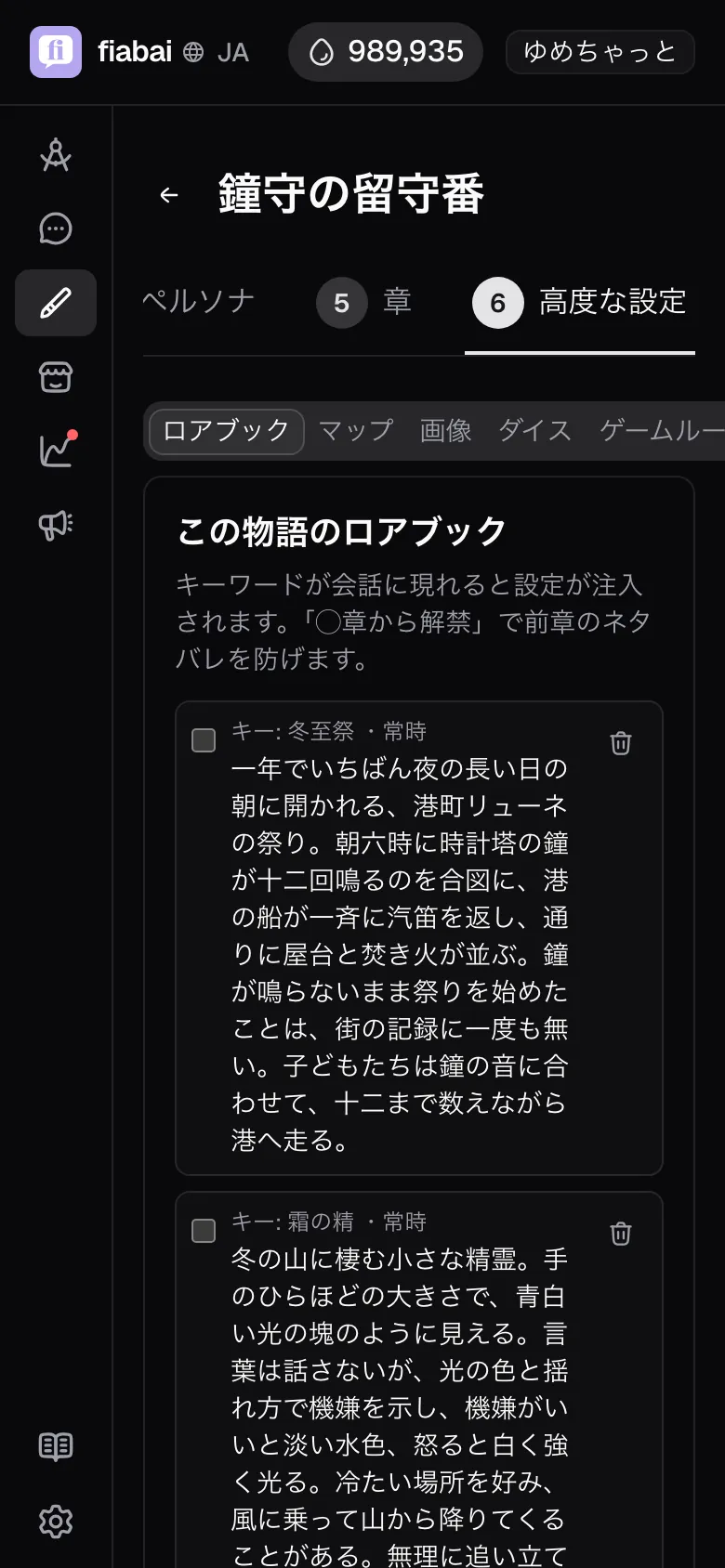
- Use the "Add an entry" box below the list. In the left field (placeholder "e.g. tavern, inn"), enter keywords separated by commas. The entry fires when one of these words appears in the conversation.
- Pick the "Unlock chapter". The default is "Always"; choose one of this story's chapters and it becomes "from Chapter ◯".
- Write the setting text you want to pass in the text area below.
{{user}}in the text is replaced with the name of the persona being played. - Press "Add" and it joins the list. Each row shows something like "Keys: tavern, inn · always".
Click a row to edit it in place, and delete it with the trash can at the right end. There is no limit on the number of entries.
How entries fire, and how much gets in
Firing is checked against the whole recent exchange the AI is looking at at that moment. Not just what you typed — words in the narration and lines the AI wrote count too. Matching is substring-based and case-sensitive. With the keyword "king", it also hits inside words like "kingdom" or "viking" and fires.
- One reply carries at most 6 of the fired entries, up to 3000 characters in total. Anything that overflows is left out of that turn.
- The slots are used first by "Always include" entries (up to 3 entries and 1500 characters), and the rest go to entries fired by keywords. Within each group, "This story's lorebook" comes first and "Imported lorebooks" after, and within the same section, entries are taken in list order.
- An entry with no keywords at all never fires, whatever comes up in the conversation, unless it is set to "Always include". The list shows it as "Keys: (none)".
- Once an entry fires, it keeps being included until its keyword scrolls out of the recent exchange. It is not passed for just one turn.
Choosing keywords
With a budget of 6 entries and 3000 characters, the granularity of your keywords decides how well it works. It can fail in both directions.
- Too broad:
kingtownswordshe. Because matching is substring-based, they also hit "kingdom", "township", "swordsmanship", and fire almost every turn. They keep holding slots and push out other entries you actually need. - Too narrow:
Head Librarian of the Royal Library of Elden. That exact sequence almost never appears in the text, so it never fires. - Just right: list 2 to 4 short words people actually type in conversation. Mixing a proper noun, a title and a nickname — "library", "head librarian", "Alma" — makes them easier to catch. One entry can hold up to 12 keywords.
- Choose nouns: matching follows the exact sequence of characters, so it does not follow inflections of verbs or adjectives ("ran" does not hit "run"). Nouns, or a stem that does not change, are caught reliably.
The length of the text affects the budget too. If one entry uses up all 3000 characters, nothing else gets in. Keep each entry to about 150–300 characters and split them by topic; they mesh better that way.
Goal
Pass the tavern-rumor setting only when the tavern comes up
Where: Advanced → Lorebook → This story's lorebook
What to write
The keyword field (e.g. tavern, inn)
tavern, inn, barkeep
Comma-separated. List short words likely to come up in the conversation
Unlock chapter
Always
The setting text area
The tavern "Silver Spoon" is where travellers' rumours gather. Gord, the barkeep, keeps his mouth shut, but leave a little extra for the drinks and he'll tell you one thing.
What happens
From the turn where any of "tavern", "inn" or "barkeep" appears anywhere in the conversation, this setting text is passed to the AI. Once the topic moves on and the words scroll away, it stops being passed again.
Goal
Never pass the truth revealed in Chapter 3 on any turn before it
Where: Advanced → Lorebook → This story's lorebook
What to write
The keyword field (e.g. tavern, inn)
altar, seal, stone tablet
Unlock chapter
Chapter 3
Pick from the chapters that actually exist in the story
The setting text area
It was not the first lord who carved the seal on the altar, but Karen herself, the high priestess of the time.
What happens
In Chapters 1 and 2, even if the word "seal" comes up in the conversation, the entry is not even a candidate. From Chapter 3 on, it is passed from the turn a keyword appears.
Note: Entries with an unlock chapter cannot be selected for "Group into a lorebook" (the lorebook they would be grouped into cannot carry a chapter).
When to use the "World setting" field instead
The "World setting" in the World step is the foundation shared by every chapter and is always passed every turn (about 5000 characters is the guideline; you can still save if you go over). A lorebook is conditional extra information passed only when a keyword comes up. Decide by asking: "without this information on that turn, would the AI get it wrong?"
- Write it in World setting: era, setting, whether magic or technology exists, the protagonist's position. Things you want to tell as one piece of text, as the foundation of the world.
- Write it in the lorebook: details of particular places, organizations, people and items. Things that matter only when they come up.
- Use the lorebook's "Always include": when you want premises that are always true as a bulleted list of facts. They are passed every time without waiting for a keyword. You can unlock them by chapter, or bundle them into a world pack to share with other stories.
- Tip for choosing: details of place names and organizations make for replies that fit the current scene better when passed only as they come up. The less you pass every turn, the more strongly what you do pass takes effect.
Narrowing keywords
Fill in the narrowing keywords below the keyword field, and the entry is passed only when both the keywords above and a narrowing keyword come up in the conversation. Left empty, only the keywords above are checked.
For example, the word training comes up often in everyday talk, but put knights, swordsmanship in the narrowing keywords and the entry is passed only while people are talking about "the knights' training", not on "I skipped training today". The advantage is that you do not have to delete a broad keyword.
Single-character keywords are not allowed. They hit parts of unrelated words (in Japanese, the character for "god" also appears in the words for "mind" and "nerve"). Even with two characters or more, a common word becomes stable when combined with narrowing keywords.
Making a reusable lorebook
If you write several stories in the same world, you can bundle entries into a lorebook and share them. There are two ways to make one.
- From the "Lorebooks" tab on the story list page, use "Create a lorebook" to make a new one and write its name, description and entries.
- To reuse story-specific entries you have already written, check the rows in "This story's lorebook" and press "Group into a lorebook". Choose a new or existing lorebook, and the entries are moved there, with the lorebook automatically added to this story.
Grouped entries disappear from the story's list and are edited from the lorebook from then on. A newly made lorebook starts out private. The limits are 200 entries per lorebook and 2000 characters of text per entry, 60 characters for the name, and 500 for the description.
Adding a lorebook to a story
Press "Find a lorebook" under "Imported lorebooks" to open a search dialog. You can search by name, description or tag; your own lorebooks are listed in the upper "Your lorebooks" section and other users' public lorebooks in the lower "Public lorebooks" section. Check the entries with "View contents", then press "Add".
- Adding is a reference, not a copy. When the author edits the contents, the change shows up right away in the stories that added it. You cannot edit the contents from the story side.
- One story can hold up to 3.
- An adult lorebook can only be added to an adult story.
- Press "Remove" to stop the injection into that story. The lorebook itself is not deleted.
- A lorebook whose publishing is suspended is not injected during play, even if it has been added.
The story's own entry wins on the same keyword
To replace just part of an added lorebook, write an entry with the same keyword in "This story's lorebook". If even one keyword overlaps, that entry on the lorebook side is no longer injected at all, and only the story-specific one is passed.
The point to watch is that the override happens only for entries already unlocked in that chapter. A story-specific entry set to "from Chapter 3" does not take part in the override in Chapters 1 and 2, so during that time the lorebook's text is passed as is. If you want to replace the setting wholesale, set the unlock chapter to "Always".
Fixing entries that never show up, or show up too much
- Never passed: check whether the keywords are empty ("Keys: (none)") or the words are too long. Switch to short words people actually type in conversation.
- Has an unlock chapter and does not show up: the chapter being played is before the unlock chapter. Advance the chapter, or set the unlock chapter back to "Always".
- Unrelated setting gets mixed in: the keyword is too broad and hits part of another word. Move toward proper nouns (
king→King of Elden), or add narrowing keywords. With narrowing keywords, the entry is passed only when both the keywords above and those come up, so you can keep the broad word while cutting firing in unrelated scenes. - An important entry does not get in: the 6-entry / 3000-character budget is being eaten by entries with broad keywords or long text. Move keywords toward proper nouns and split the text into shorter pieces. For the one entry you really want passed every time, switching it to "Always include" reserves its slot.
- The contents of an added lorebook are not passed: check whether you wrote an entry with the same keyword on the story side, and whether that lorebook's publishing is suspended.