Contents▾
Getting started
How to play
Play from ExplorePlaying a chatPlaying storiesHow Ink worksSet up your personaPlay with diceHow to create
A worked exampleCreating a characterCreating a scenarioInline images: illustrations in the chatMoving the story with phasesEmotion parameters for personalityFeed world facts on demandBuilding a TRPGMake images and videoPublish your workGetting better
Writing so the AI understandsPlay from Explore
You can start playing right away, without creating a character or scenario yourself. Explore lists the characters and scenarios other users have published. Open anything that catches your eye and start chatting.
What you can do in Explore
- The Explore page lets you browse and search every published character and scenario. You can view it without signing in.
- A scenario's detail page shows the synopsis, the characters, and the phases it moves through, so you can read up before you start.
- From a character's detail page you can start a free talk with that character, or move on to the scenarios and stories they appear in.
- Save any scenario or story that catches your eye with the bookmark button on its card or detail page. Open your saved works from the Saved tab in Chats and start playing them right away. Only you can see what you have saved.
How to start playing
- Open a scenario that interests you from Explore.
- Press "Start a chat with this scenario" on the detail page (if you are not signed in, "Sign up and start chatting" takes you through registration first).
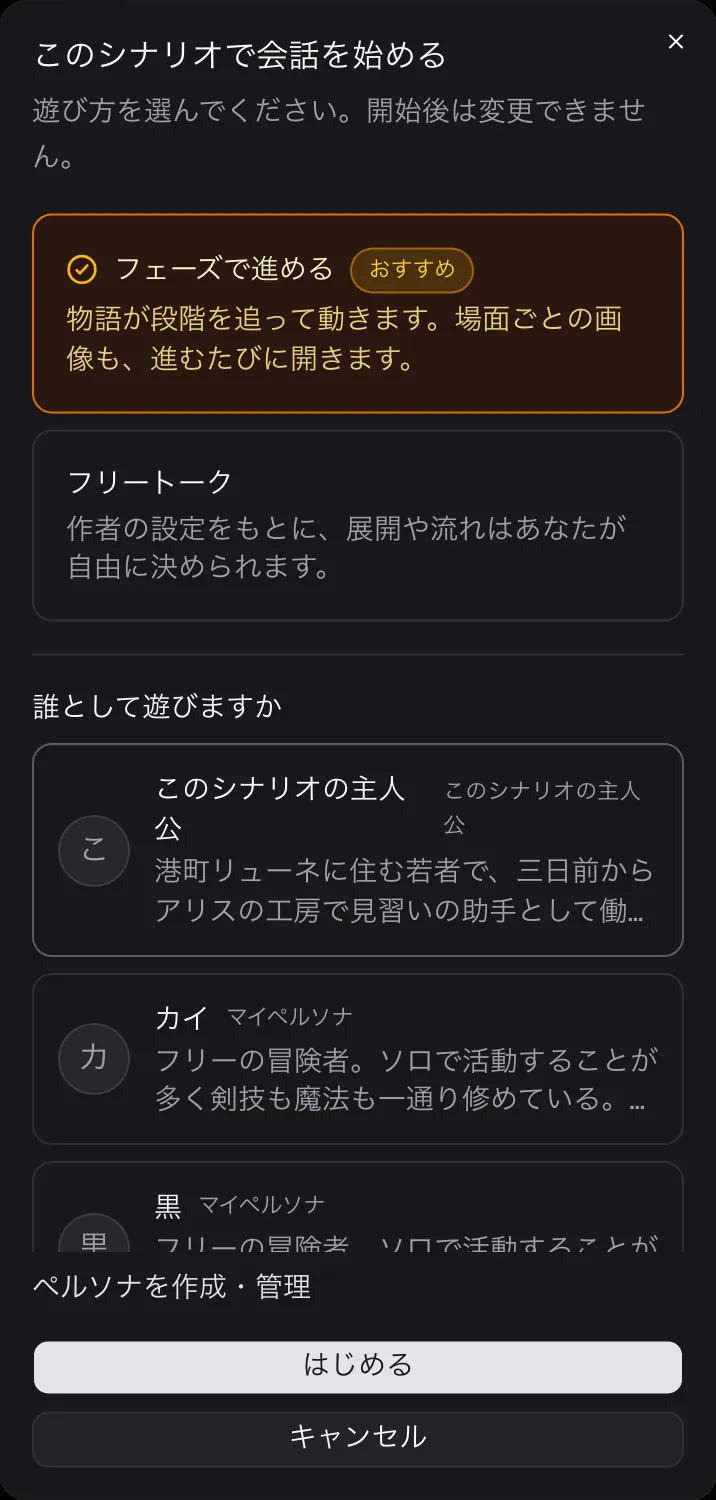
- For a scenario with phases, a dialog opens where you choose how to play and who you play as.
- Advance through phases (recommended): play the storyline the author built, scene by scene. Each scene's images unlock as you move forward.
- Free talk: build on the author's setting and decide the direction and flow yourself.
- Who are you playing as?: choose the protagonist the author prepared, or one of your own My personas.
- When the chat opens, the author's opening scene appears automatically. From there, just send a message. Starting a chat is free; each message you send spends Ink (see How Ink works).
NSFW visibility setting
NSFW (adult) scenarios and characters do not appear in Explore by default. You have to turn them on yourself.
- Turn on "Show adult scenarios in Explore" on the Settings page. The first time you enable it, you will be asked to confirm that you are 18 or older.
- Once it is on, NSFW works appear in Explore listings. While it is off, they never show up at all.
💡 If a scenario you marked NSFW is not showing up in Explore, check that this setting is on. Visibility is decided by the viewer's own setting.
💡 If playing makes you want to build a story of your own, head to the How to create chapter. One character and one scenario is enough to start.