Contents▾
How to play
Play from ExplorePlaying a chatPlaying storiesHow Ink worksSet up your personaPlay with diceHow to create
A worked exampleCreating a characterCreating a scenarioInline images: illustrations in the chatMoving the story with phasesEmotion parameters for personalityFeed world facts on demandBuilding a TRPGMake images and videoPublish your workGetting better
Writing so the AI understandsPlay with dice
Stories can settle whether an action succeeds with a roll of the dice. The server fixes both the roll and the outcome, and the narrator writes the scene exactly as it landed. Failures are written as failures, so the story can take turns no writer planned. This page covers both what players do and what authors set up.
For players: three ways to roll
In the Explore listings, stories that use dice carry a "Dice" badge. In the chat screen, a 🎲 Dice button appears in the input field. There are three ways to roll.
- Roll yourself from the Dice button. Press 🎲 Dice and the "Roll a skill check" sheet opens with the list of skills. Tap a skill and the server rolls one die on the spot. The result appears in a toast.
- Roll when the narrator asks. When the narrator decides at the end of a reply that a check is needed, a card appears saying "A “Persuasion” check is being asked for." Press 🎲 Roll and see what follows and it rolls, then generates the continuation with the result included (you do not need to type anything).
- Roll from a reply suggestion. The suggestions for your next action below a reply sometimes carry a 🎲 skill name badge. Tap one and the check is rolled first, then the action text is sent.
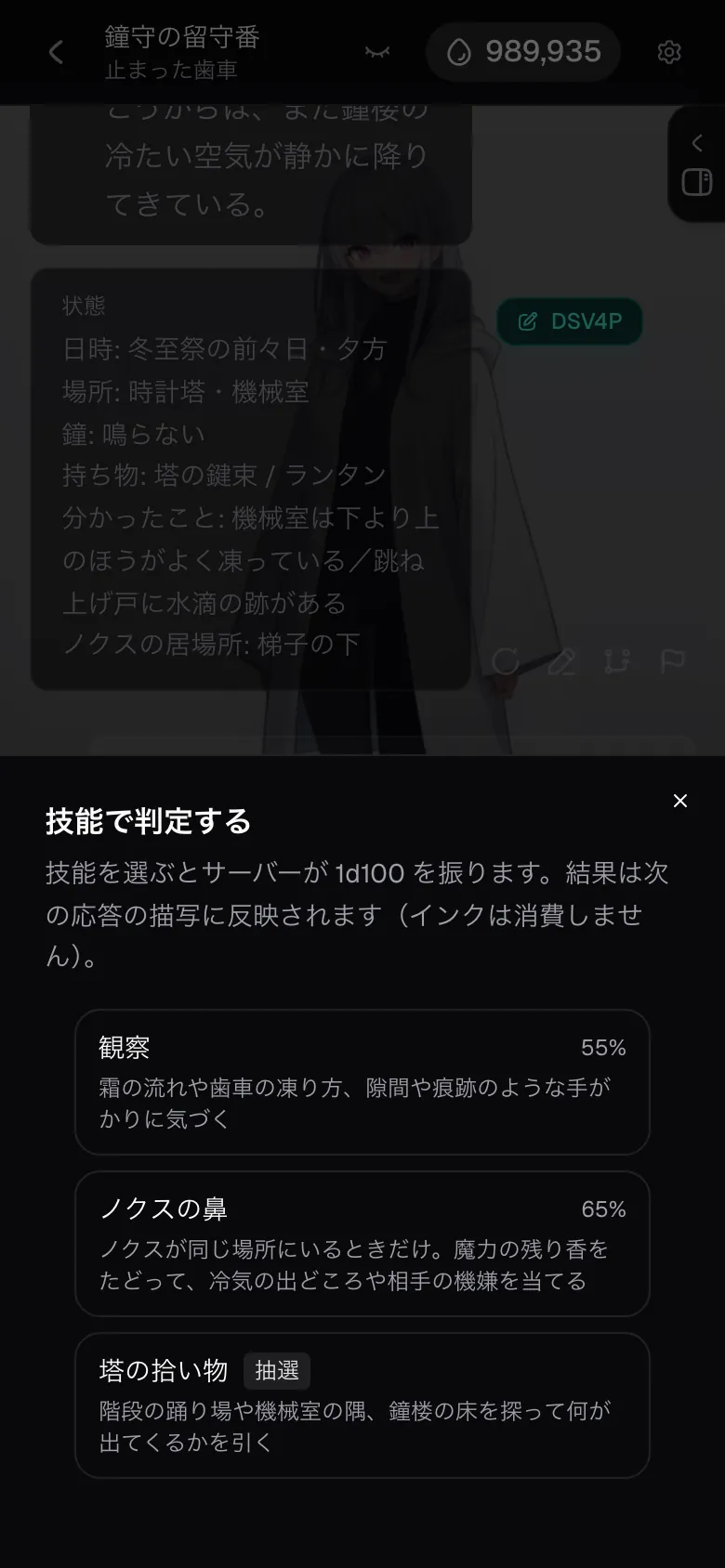
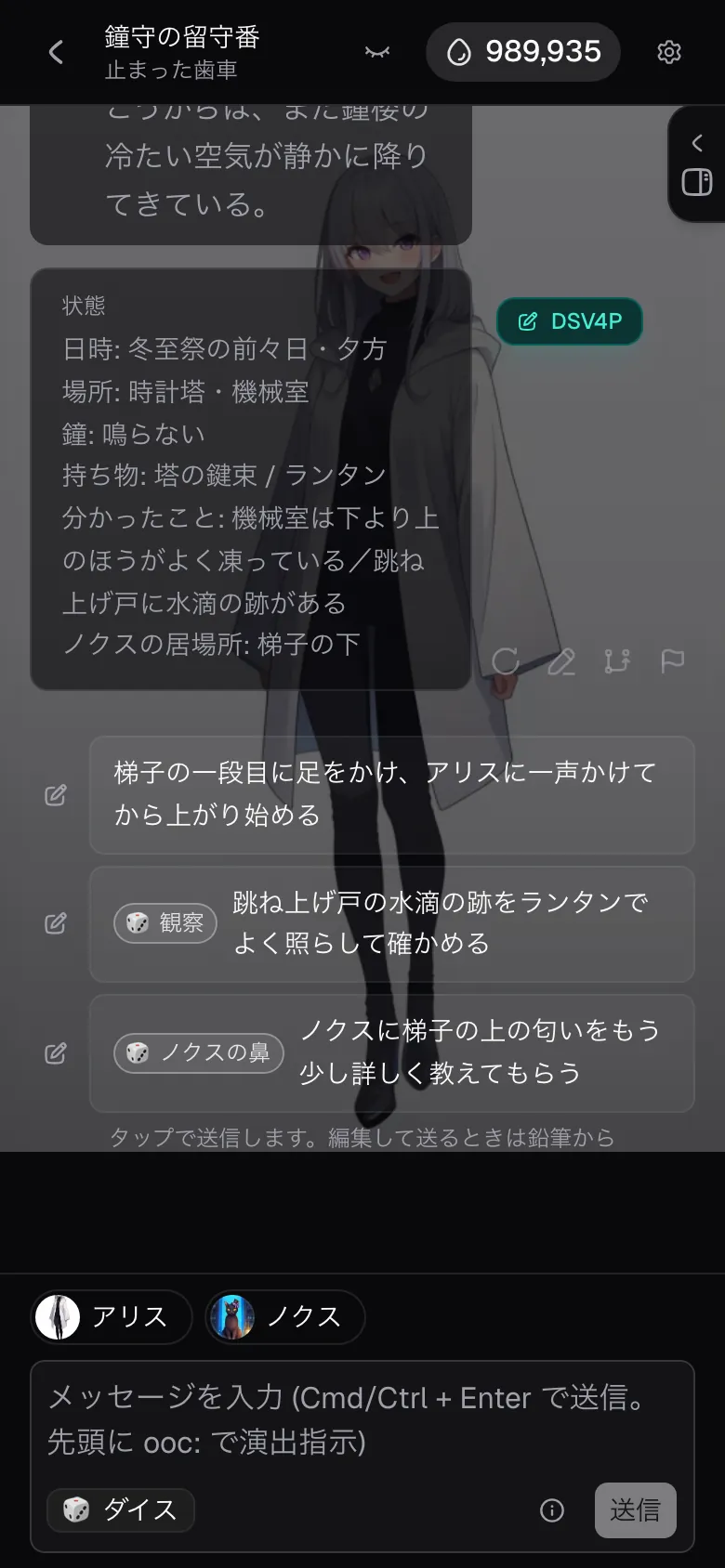
Each roll stays in the timeline in the form 🎲 Observation 60% → roll 42 → Success. There are four outcomes: Critical success / Success / Failure / Fumble. Rolling itself costs no Ink; the only cost is the one turn for the next message that has the result written into the scene.
No rerolls
Even if you do not like the roll, you cannot roll again. Right after a roll, the check is "not yet narrated", and any further roll is refused until the next reply comes out. When the button cannot be pressed, the reason is shown as is.
- Checks become available once the conversation has started.: the opening has not appeared yet.
- You cannot roll while a reply is being generated.: wait for generation to finish.
- Your last roll has not been narrated yet. Wait for the next reply.: you cannot roll again until the result has been written into the scene.
The AI cannot rewrite the roll or the outcome. In turn-limited chapters, a fumble also takes one action off what you have left (it enters the narration as the fact that time was lost).
For authors: where to find it
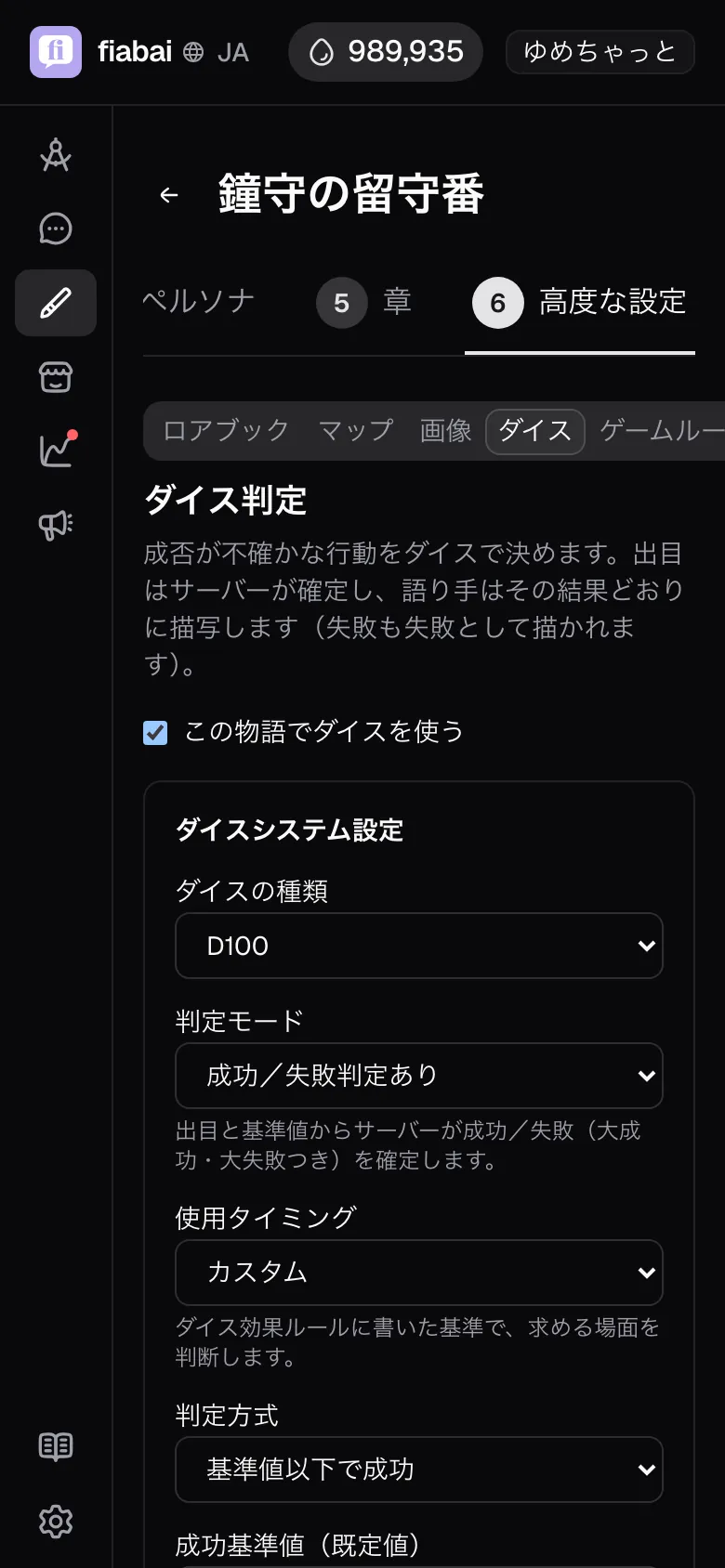
- In the story editor, go to the Gameplay step and open the Rules & checks tab.
- Check Use dice in this story. The first time, four skills are added automatically (observation, persuasion, athletics and intuition).
- Adjust the skills and the dice system settings, then Save. You cannot save with zero skills.
Defining skills
A story can have up to 12 skills. Each skill has these fields.
- Skill name: up to 20 characters. { } and line breaks are not allowed. The name is the key used to match the tags the narrator writes, so do not add symbols or decoration. You cannot save if two skills in the story share a name.
- Type: Check (a target number decides the outcome) or Lottery (an outcome table decides the result).
- Description: up to 100 characters. This goes to the narrator as is. Make it one line that shows when to roll, such as "notices what others overlook".
- Target number: only for check skills. With the default D100 it runs from 5 to 95. Leave it empty and the Target number (default) is used (if that is not set either, saving is refused).
The narrator receives only the skill name and description. Neither the target number nor the outcome table is passed on. Show the narrator the odds and it starts reasoning in probabilities ("70%, so this should be fine"), which breaks the premise that the server decides the result.
Dice system settings
The Dice system settings above the skill fields set the rules for the whole story.
- Die type: D6 / D10 / D20 / D100. The default is D100.
- Judgment mode: With success/failure judgment or Raw roll only (no judgment). Raw roll only judges no success or failure and uses the roll itself in the narration. The target number, critical and fumble fields are hidden.
- When dice are used: AI decides automatically (default) / Only when the user asks / Custom. With "Only when the user asks", the narrator stops asking for checks (no check request cards appear). "Custom" has the narrator decide by the criteria written in the dice effect rules, so you cannot save it while the effect rules are empty.
- Success rule: Roll at or under the target to succeed or Roll at or over the target to succeed.
- Target number (default): used when a skill has no target number of its own.
- Critical at / Fumble at: 5 and 96 by default. You can only save if the critical value < the fumble value for "Roll at or under the target to succeed", or the fumble value < the critical value for "Roll at or over the target to succeed". A skill's target number can only sit in the range between these two (5 to 95 by default).
- Dice effect rules: up to 1,000 characters. The server does not interpret them; they are a staging layer the narrator applies in the narration. Write what a fixed roll means, such as "on a roll divisible by 3, a tailwind rises".
How the roll reaches the story
The moment you roll, the server fixes the result and sets up a note to pass to the next reply. The note says something like "Success: rolled 42 against a 60% success rate. This result is settled; reflect it in the narration without changing it." A critical success adds "settle one clear gain and describe it", and a fumble adds "settle one clear cost and describe it".
The note is cleared once the text is final. That is why rolling alone does nothing, and the result enters the narration in the reply to your next message. "Roll and see what follows" on the check request card bundles those two steps into one tap.
Attaching skills to reply suggestions
Turn on Show choice chips in the Game rules tab, and candidates for the next action are generated after every reply and lined up below it as "Reply suggestions". In stories with dice enabled, candidates whose outcome is uncertain get one skill attached for the check, becoming suggestions with a 🎲 skill name badge.
Only skills in the skill list are attached, and candidates with no matching skill are listed as ordinary suggestions. The suggestions are generated in a separate call from the main text, so as long as the option is on they appear even if the game rules text is empty, or "When dice are used" is set to "Only when the user asks".
Goal
I want luck to decide who visits each night (not success or failure, but what happened)
Where: Dice tab > Skills > Type = Lottery
What to write
Skill name
"First-night visitor". Write the description so it is clear when to draw, such as "divines who arrives on the first night".
Type
Choose Lottery (an outcome table decides the result). The target number field disappears and the outcome table appears.
Outcome table
On each row, write the "Upper roll" and the "Result". For example: 40 "the cavern troll" / 80 "a peddler" / 100 "nobody comes".
What happens
The server rolls and draws from the outcome table, then passes only the settled result to the narrator. The timeline keeps "🎲 First-night visitor → roll 63 → “a peddler”".
Note: A table has 2 to 20 rows. Upper rolls go in ascending order, and the last row is fixed at the die's maximum (so every roll always lands on a result). Results are up to 40 characters, and { } and line breaks are not allowed. The table's contents are shown to neither the narrator nor the player.
Goal
I want the roll itself to carry a meaning of its own, rather than success or failure
Where: Dice tab > Dice system settings
What to write
Judgment mode
Choose Raw roll only (no judgment). The success rule, target number, critical and fumble fields disappear.
Dice effect rules
"On a roll divisible by 3 a tailwind rises and the action takes a small turn for the better. On the maximum roll narrate a vivid stroke of luck; on the minimum, one unexpected cost."
What happens
The timeline shows only "🎲 skill name → roll 7", with no success or failure label. The narrator gives the roll its meaning by following the effect rules.
Note: The effect rules are a staging layer the server does not interpret. Write something irreversible, such as "a roll of 1 means instant death", and the narrator will carry it out as written.
Common snags
- You switched to D20 or D6 and cannot save ("The fumble value must be between 1 and 20") → changing the die type leaves the critical and fumble values at their D100 settings (5 and 96). Fix them by hand to fit inside the new number of sides (for D20, a critical of 2 and a fumble of 19, for example). Then put each skill's target number back inside the new range ("Target numbers run from N to M." appears below the field).
- You changed the number of sides in a lottery story and see "Upper rolls in the outcome table must be between 1 and 20" → only the last row follows the change automatically; the rows in between keep their old values. Put the upper rolls back in ascending order.
- "Check skills cannot have an outcome table" → you switched from lottery back to check, but the table is still there. Switch the type over again and the table is dropped.
- Reply suggestions do not get a 🎲 → if the skill name attached to a suggestion differs from the name in the skill list by even one character, it is listed as an ordinary suggestion. Do not decorate skill names, as in "Observation (lottery)". If no suggestions appear at all, check that "Show choice chips" in the Game rules tab is not turned off.
- A check is asked for but no button appears → the narrator wrote a name that is not in the skill list. "A check is being asked for. Pick a skill from the dice button." appears, so roll from the Dice button. Rewriting the skill descriptions more concretely makes it less likely to happen again.
- Checks are never asked for → see whether "When dice are used" is set to "Only when the user asks". With that setting, the narrator does not ask for checks.
- You rolled but nothing shows in the narration → rolling is free, and the result goes into the narration with your next message. Send something, or use "Roll and see what follows" on the check request card.
- You cannot find the Dice button → dice are a feature of stories and do not appear in scenario chats. You also cannot roll from the chat screen of a finished chapter.